


Keep Your Proposal on Track with RAG Status Tracking
In earlier posts in this series, we talked about transforming chaos into clarity, the strategic value of executive involvement early and throughout the proposal process, and the power of visual storytelling. But even with a strong solution and a great team, proposals can veer off course unless managed effectively.
That’s where RAG (Red, Amber, Green) status tracking comes into play.
In this post, we’ll look at why RAG status tracking helps keep everyone aligned and on track to hit the submission deadlines. And has the added benefits of keeping executives informed efficiently and reviews productive.
What is RAG status tracking and why use it in proposals?
RAG stands for Red, Amber, and Green – a simple and visual traffic-light system used to communicate status. Common in project management, it’s equally powerful in proposal management. Where:
- Green = On track and fully scoped
- Amber = At risk or incomplete; needs attention
- Red = Off track, behind, or at risk
When used effectively, RAG status gives everyone from writers and SMEs to leadership a shared view of risk, readiness, and reality.
While originally applied through frameworks like PRINCE2 and PMBOK (Project Management Body of Knowledge), RAG tracking is now widely used across industries to support faster decision-making and transparent status reporting. According to projectmanager.com, organizations using clear RAG indicators experience better alignment and quicker issue resolution.
Why proposal managers should use RAG status tracking
Proposal work moves fast as content evolves, requirements shift and contributors juggle conflicting priorities. In that kind of environment, “we think it’s fine” is not a confidence-building status update.
The benefits of using RAG in proposals include:
- Faster visibility of risk and progress gaps
- Aligned expectations between writers, reviewers, and leadership
- More productive daily standups and team meetings
- Better readiness for Color Team Reviews and submission gates
- Reduced likelihood of late-stage surprises
- On-track progress toward the submission deadline
A study by BestOutcome found that RAG tracking improves early risk identification and accountability when paired with clear criteria. In proposals, this means identifying issues early and taking active steps to get back on track rather than leaving it until it may be too late.
RAG status tracking doesn’t need to be limited to just proposal development – you can have several boards to cover the whole proposal lifecycle, e.g., one for the Capture and Bid team and another for the proposal development phase. Or combine them into one master board, as we have done for some of our clients.
Risks of not using RAG status tracking
Skipping RAG status tracking in your proposal management increases the likelihood of:
- Status ambiguity (one person’s readiness is another person’s danger zone)
- Last-minute rework
- Conflicting priorities across streams (e.g., solution creation vs writing )
- Missed dependencies (late content delivery leading to delays)
- Poorly informed executives (who may assume that everything is under control)
And worst of all, it can lead to false confidence. When everything “feels fine,” issues can stay hidden until too late to fix. Using RAG creates a shared view where potential issues can be identified early, allowing them to be addressed without derailing the bid.
How to set up a RAG status tracking system
The good news is you don’t need fancy software to get started. Here’s a high-level setup any proposal manager can implement:
1. Define clear criteria
Decide what Red, Amber, and Green mean for your proposal, not just generically, but for each section or stream.
Here are some examples for narrative content:
- Green: Section drafted, ready for a review gate, and aligned with compliance requirements and win themes
- Amber: Drafted but missing evidence or reviewer input
- Red: Not started or known blockers (e.g., missing SME, unclear scope)
Make sure they are factual and objective to avoid any ambiguity.
2. Establish ownership
Assign responsibility for updating RAG status regularly, daily, or after every major meeting. At Salentis, writers are expected to update their section status ahead of stand-up meetings and the proposal manager’s responsibility is to ensure the RAG board is up to date and accurate.
3. Integrate with reviews
Sync RAG status to Color Team Review readiness and internal review cycles.
4. Act on ambers and reds
Use amber as a trigger for action; don’t wait for an item to become red.
Understand the escalation process and steps to take.
5. Keep a record
Note decisions taken in response to status changes as this builds a history of responsiveness and provides an excellent audit trail.
Tools that work well for RAG status tracking
You can adapt RAG tracking to nearly any tool your team already uses. Here are a few to consider:
Trello
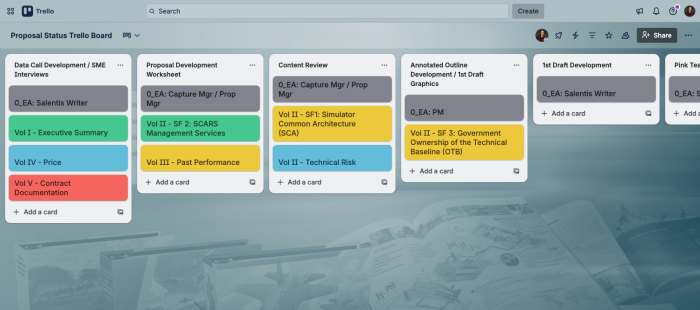
This is our tool of choice. Use color-coded labels on cards (e.g., Red = major issue, Green = complete). It’s great as an at-a-glance pulse of proposal progress and easy to update. It gives one view of the proposal and our clients have 24/7 visibility as long as they have an internet connection. Here is a sample of one of our boards showing the stage of the proposal development and progress of tasks within each stage:
Excel or Google Sheets
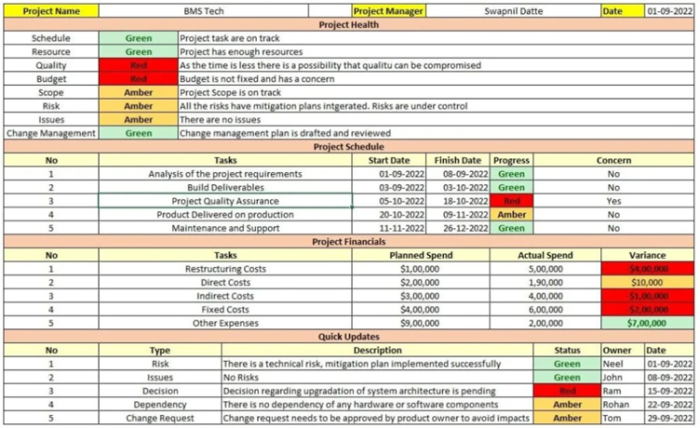
Create a dashboard that uses conditional formatting to display RAG status dynamically. Projectmanager.com has a template you can download here. But be careful, as spreadsheets can easily get out of date, or you can end up with multiple versions.
Here is an example of an Excel RAG tracking system:
Slack/Asana/Monday.com
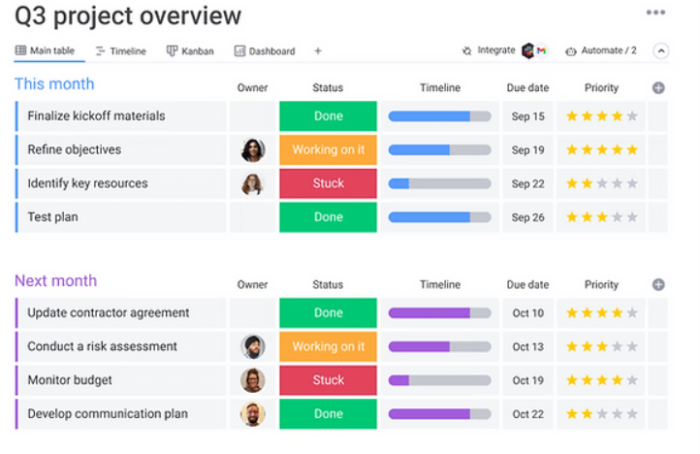
You can build in status columns with automation rules.
Here is an example from Monday.com:
How Salentis uses RAG in Trello
At Salentis, we use Trello boards extensively to manage proposal development. Each board includes:
- Swimlanes/Lists by sprint or phase of proposal development: e.g., Annotated Outline/1st Draft, Pink Team Review, Pink Team Recovery
- Guidance on when an item can be moved to the next stage (or swimlane):
We call them exit criteria - Color-coded labels: RAG status applied at the card level (a card is the individual proposal section that is being tracked)
- Checklist items: e.g., Win theme mapped, SME interview(s) complete, evidence linked, graphics produced, compliance checked
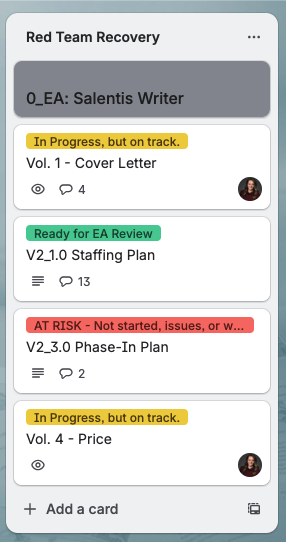
The board with RAG updates are shared (visually) at each stand-up meeting and easily seen Red items are addressed. That means we catch issues early, assign actions, and track momentum. It also means we don’t waste a lot of time talking about the status of sections that are on track.
A simple glance tells the proposal manager and execs where attention is needed as the screenshot below of four cards shows:
Client example: Turning around a proposal with disciplined RAG status tracking
In a recent engagement with a large defense contractor, Salentis saw firsthand the difference disciplined RAG tracking can make in a proposal effort that was drifting off track.
Early in the capture and proposal development phase, the team was busy. Drafts were underway, reviews were scheduled, graphics were in progress and contributors were working hard. Yet despite the activity, there was no shared, objective view of progress.
Some sections were ahead, whilst others lagged quietly behind. Dependencies were unclear and risks surfaced late. Status meetings relied on narrative updates and subjective phrases like “mostly on track.” The team felt busy, but not synchronized.
The intervention: A RAG status tracking board in Trello
We introduced a simple but disciplined RAG status tracking board in Trello, structured around defined proposal development phases and clear Exit Criteria. Each proposal section was represented with its own card and color-coded according to objective standards:
- Green – Section complete for that phase, meets established Exit Criteria, and ready for Exit Authority Review before moving forward
- Amber – On track, but not yet complete; work remaining to meet Exit Criteria
- Red – At risk; requires leadership attention, corrective action, or resolution of deficiencies
Importantly, status was not self-declared based on optimism. It was tied to predefined Exit Criteria for each phase. If the criteria were not met, the card could not be Green.
Within days, the team shifted from vague confidence to true line-of-sight on deliverables.
Before RAG tracking
The process was active but not controlled:
- Status meetings were long, with verbal updates from each section lead
- Updates mixed too much detail with too little clarity
- “Mostly done” masked real deficiencies
- Risks were discovered late, often just before key reviews
- Review teams experienced uneven section readiness
- Leadership lacked a rapid visual understanding of overall health
After RAG tracking
- Daily stand-ups included a 60-second visual scan of the board
- Red items were immediately visible and quickly actioned
- Amber items triggered focused coaching and resource adjustments
- Exit Authority Reviews became objective, not emotional
- Color Team Review readiness improved dramatically
- Leadership gained immediate situational awareness
Instead of debating status, the team focused on solving problems and the board created:
- Transparency
- Accountability
- Early risk identification
- Disciplined phase transitions
- Predictable review readiness
The outcome
The proposal was submitted on time. It was compliant, organized, and competitively positioned. But the true impact went beyond the submission date. The RAG board didn’t just track progress. It drove behaviors, reduced friction and chaos/anxiety, raised accountability, enabled earlier intervention, increased team confidence, and improved the quality of reviews. What had been a drifting effort became a controlled, disciplined proposal operation.
Summary
Proposal managers and executives need more than deadlines; they need an on-going progress check. RAG tracking delivers that.
It simplifies reporting, shows where things are going off track, clarifies risk, aligns priorities, and builds confidence. When done right, it’s not just a traffic light system. It’s the heartbeat of disciplined proposal management.
Key things to remember:
- Establish clear criteria for RAG statuses
Define specific, measurable thresholds for red, amber, and green statuses based on your process. Don’t leave room for ambiguity. Include the criteria in your tracking tool. - Keep the tracking document/tool updated.
Ensure one person is responsible for making sure it’s updated and managing versions (if using Excel for example) - Use the tracker in your stand-ups and to share with the executive board
Ensure everyone is on the same page. - Use RAG statuses to drive action
Develop clear action plans for each status, green, amber, and red and ensure your team follows through.
If you’d like help building your own RAG-based proposal board or want to see how Salentis adapts it across different bids, get in touch. We’d be happy to walk you through it.
Previous posts in the series:
From Chaos to Clarity: Proposal Leadership That Wins
The Benefits of Active Listening During the Capture Phase
Why you should use infographics in your proposals

About the author
Mindy Marchel is Chief Operating Officer and co-founder of Salentis International. With 17 years of proposal development experience, Mindy brings a sharp focus on what it takes to win. As co-developer of The Salentis Way® she empowers teams around the world to deliver maximum quality and value to government, infrastructure, energy, and IT clients. With over 150 projects totalling more than US$100 billion under her belt, Mindy supports Salentis teams across the Americas, Asia Pacific, and UK-EMEA – all with one goal: to craft compliant, compelling bids that make our clients the obvious choice

Article published: March 2026
Back to Articles Page